
Reporting
Annual reports are vital to the statewide OSU Extension Service Outdoor School Program. The data and stories provided by schools help the Outdoor School Program team assess outdoor school’s impact on all Oregon students and promote the need for continued investment from the Oregon Legislature.
Report deadline is July 31
Our online reporting system opens in late October and is accessible only after a school’s annual application has been approved. Schools can open and complete their report once they finish their outdoor school experience. When all schools in a given district have completed their individual reports, the district may then submit the report package for reimbursement. The final report deadline for the previous school year is July 31. Reports submitted after the deadline will not be reimbursed.
While the deadline is July 31, we encourage you to report as soon as practical after the outdoor school experience concludes. Submitting before the end of the school year is strongly encouraged.
Key reporting information
Where to report
Please read the instructions on this page to understand the process thoroughly. When ready, use the button link to access the online application and reporting system (OARS).
Please contact your outdoor school regional program manager or the main office ([email protected]) if you have questions.
Who can report
Designated district representative or Outdoor School contact
Each district superintendent must assign a representative, known as the District Designate. Only one District Designate is allowed per district. Every designate must register in the Outdoor School application and reporting system and is responsible for submitting timely and accurate reports for school reimbursement. The District Designate is responsible for THREE report components:
- The administrative report AND
- Entering Teacher/Chaperone Contacts for the Teacher Chaperone Questionnaire (TCQ) AND
- Uploading a correct program summary for each school’s ODS experience.
Report components
Administrative report
The administrative report includes all fiscal questions, provider & site details, student attendance data, as well as student participation and inclusion methods. This part of the report can be delegated to contributors who keep records for the school, similarly to the application, but is not intended for anyone who doesn’t track administrative data for the Outdoor School (ODS) grant or who didn’t work directly with student outreach and inclusion. The district Designate can delegate this portion of the report to a contributor by selecting the “DELEGATE” button in the report and entering the contributor's email address. An email will be sent to the contributor to input data for that specific school. The admin report is mandatory for receiving the grant reimbursement.
Entering Teacher/Chaperone questionnaire contacts
Teacher Chaperone Questionnaire Contacts are adults who attend outdoor school along with students as a supervisor or chaperone.
Designates will provide names and emails for teachers and accompanying adults (chaperones) at a ratio of 1 contact per 30 students. Providing these contacts is mandatory for submitting your report and receiving grant reimbursement. Questionnaire contacts will receive the Teacher Chaperone Questionnaire (TCQ) via email and will have reminder emails sent to them until it is completed.
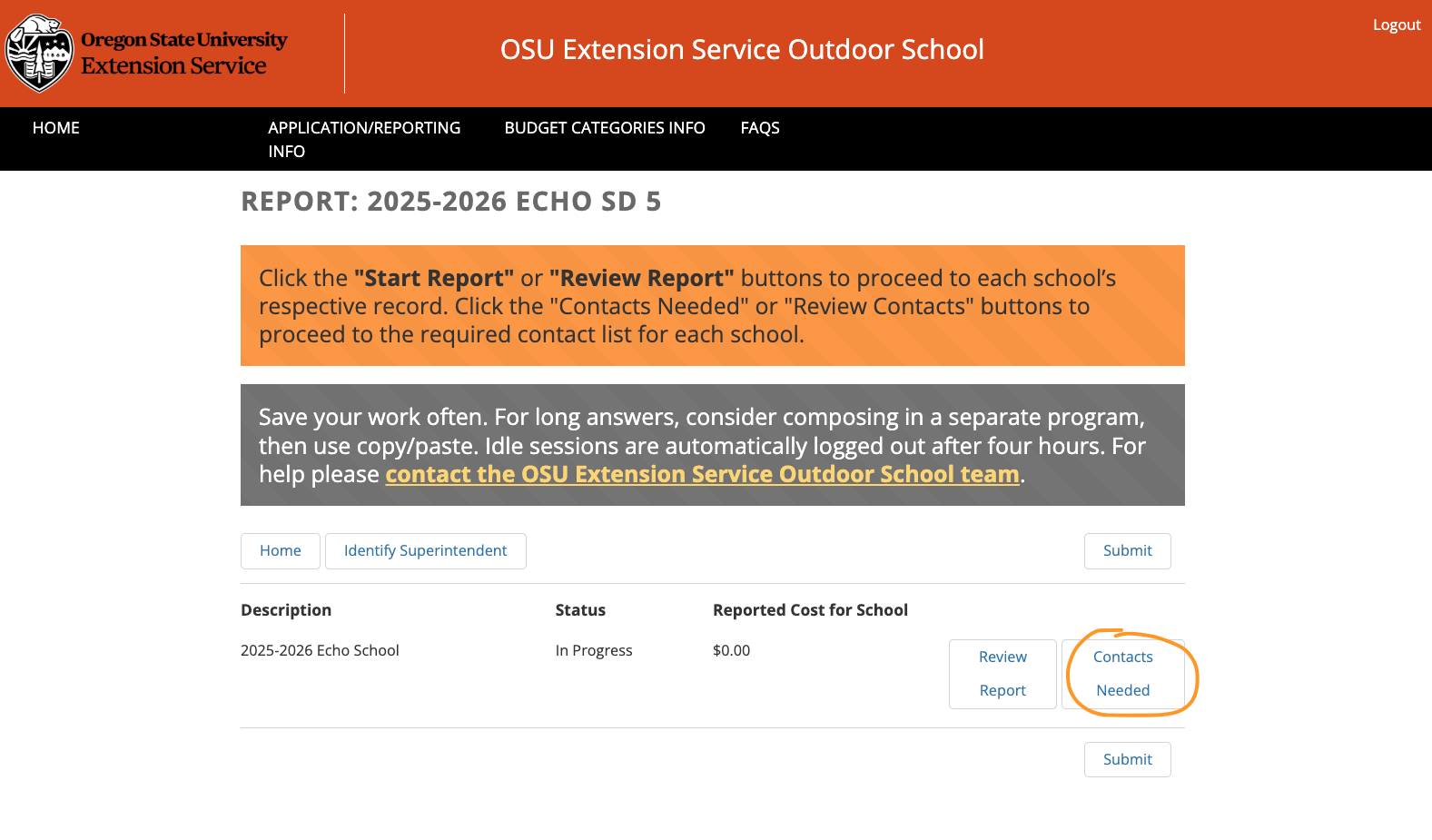
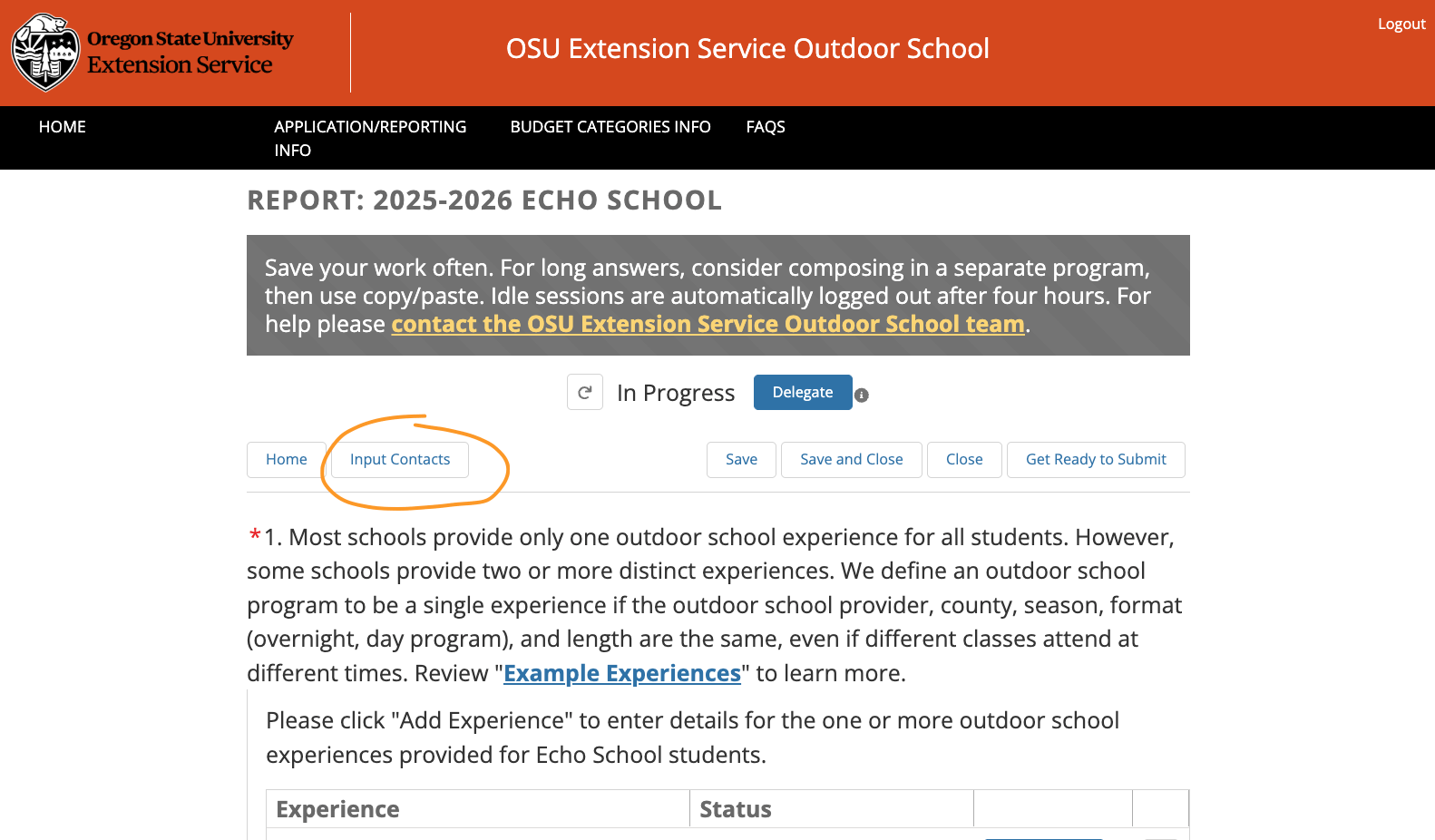
There are two places in the report to input the Questionnaire Contacts. You can access the “Contacts” function of the report anytime in the Online Application & Reporting System (OARS): from the report home page, click the “Contacts Needed” button associated with each school in your district’s report. Once enough contacts are entered for that school, this button will change to “Review Contacts,” which you can edit if needed. You can also enter contacts by clicking on an individual school’s report by clicking “Input Contacts."
Below are screenshots of the process of inputting Questionnaire contacts:
Timing of Questionnaire emails
In the Contact List, the Designate must enter Questionnaire contacts for each month students attend outdoor school. If students attend in multiple months (e.g., October and March), enter the required number of contacts separately for each month.
- If a Questionnaire contact is submitted before the start of the month of attendance, the contact will receive the questionnaire on the first Tuesday of the month of attendance.
- If a Questionnaire contact is submitted after the month of attendance begins, the contact will receive the questionnaire on the first Tuesday following their addition to the Contact List.
Teacher chaperone questionnaire
Designates will provide names and emails for teachers and accompanying adults (chaperones) who attend outdoor school along with students as a supervisor or chaperone. Designates will enter these Questionnaire contacts at a ratio of 1 contact per 30 students using the “Contacts” function of the report, which can be accessed at any time in the Online Application & Reporting System (OARS). Teacher/chaperone contacts will receive the Teacher Chaperone Questionnaire (TCQ) directly via email.
Program summary for report
The program summary only needs to be about 2–3 pages long and must include both the program calendar and descriptions of subjects and activities. You must upload this summary as a single PDF (maximum 8 pages). Separate or oversized documents will not be accepted and will be returned for revision. Use the program summary template when preparing your PDF.
If your school worked with an outdoor school provider, the provider should be able to provide you with a program summary that you can attach to your report.
How to report
To report, you must first register in the Outdoor School Application and Reporting System (OARS) (see instructions above). You can log in to the system as often as necessary to complete your application or report. Be sure to save your work frequently.
- Fill out an application or report for each participating school within your district.
- Applications should only include schools within the district's boundaries.
- Only one application or report package can be managed per payment cycle at a time.
- The District Designate can complete this or delegate parts of it to a contributor using the "delegate" button.
- Contributors complete their section and return to the Designate:
- Once you have completed portions of the form that are relevant to you, click the “Submit for district review” button.
- This step returns editing power back to the District Designate.
- Note: Once returned to the Designate, the link you received via email will no longer work.
- Designates: Get ready to submit: before submitting, ensure all your answers reflect the entire school year, each component of the form is complete, and that all participating schools have been included.
- Submit your application or report:
- “District Designates” review all the content for each school in your district’s package.
- Once all forms are completed for each participating school in your district, click “Submit”.
- Note: If you need to change something in the application or report, contact your regional coordinator to re-open it.
If you need assistance, feel free to contact us at [email protected].
How to register
District Designate registration:
- The District Designate must register as a user by selecting "Create a new account" in the lower-right corner below the login button.
- Choose a password to be used for all future access.
- When registering for the first time, you will need to know your assigned Intergovernmental Agreement (IGA) number - if you do not know this, contact your regional program manager or email [email protected].
Delegate/Contributor registration:
- If you have been delegated a report, you must register using the link sent to you in an email.
- From that link, you will be able to access the unfinished report that you have been delegated by the Designate.
- Do not use the "Create a new account" option; only the District Designate should do so.
New reporting process
Why the reporting process changed
- Simplified reporting for district designates who will no longer be asked to provide direct observations about students and the outdoor school experience
- A greater pool of data with more diverse perspectives on outdoor school activities and outcomes
- More timely and relevant evaluation of outdoor school experiences
- More timely grant reimbursements to districts
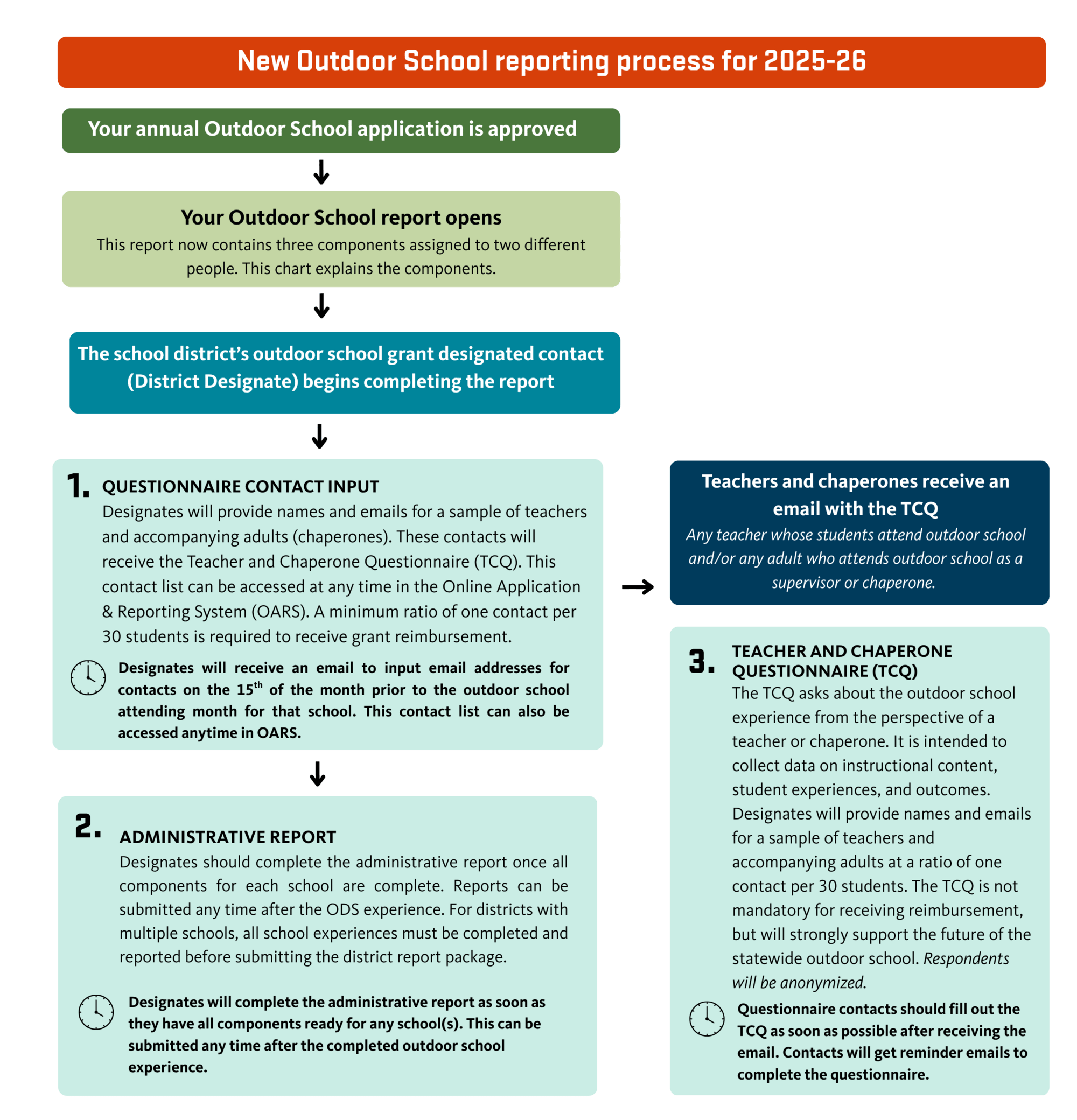
Components of the report that remain the same
- Program summaries remain a vital component of the report and must contain the following: your school’s name, program dates, activities, and academic subjects covered. You must upload this summary as a single PDF (maximum 8 pages) that includes both the program calendar and descriptions of subjects and activities. Separate or oversized documents will not be accepted and will be returned for revision.
- Delegating components of the report is still possible for the Administrative Report. Teachers or administrative staff from individual schools can be delegated an Administrative Report from the district, Designate to complete the questions and save and return to the district for submission. However, we expect some will no longer need to delegate the Administrative Report because the questions have changed.


